
Can you try Genjutsu for free and download the finished video?
Higgsfield Genjutsu supports exporting a completed video. A no-payment attempt depends on your account having an eligible allowance that covers the selected run, plus permission to download the result. We have not verified that complete free workflow. A platform trial alone does not establish Genjutsu access, sufficient credits, or a watermark-free file.
- Documented
The official Genjutsu guide includes an export step, and Assets has file downloads.
- Check your account
The current offer, Genjutsu access, credit balance, quote and renewal terms.
- Not tested
Activating an MCP trial, generating with its credits, and downloading that finished video.
Sources: official Genjutsu workflow and account and Assets help. Public documentation reviewed October 12, 2026; no trial was redeemed for this guide.
On a small screen, scroll each table sideways to read all columns.
What does “free” actually cover?
Separate the price of access from the cost of a single generation. A paid subscription can include runs that deduct no credits while still requiring a purchase. Free preparation also does not supply a rendered video.
| Option | What to verify | Does it establish a no-payment Genjutsu video? |
|---|---|---|
| Free account | Whether this model is accessible and an eligible allowance exists. | No universal allocation has been verified. |
| Limited trial | Eligibility, card requirement, deadline, supported models and automatic renewal. | Only if its terms and allowance cover the complete attempt. |
| Promotional credits | Where they can be spent, when they expire and the actual quote. | Only when the credits are applicable and sufficient. |
| Paid-plan free generations / Unlimited | The covered model, web-only conditions and required subscription. | The plan itself still costs money. |
The official credit rules distinguish purchased-plan allowances from credit spending. Check the current plan card and generator rather than treating “free generations” as a free account.
Are the website and MCP trial the same?
No: website free-generation and Unlimited entitlements do not carry over to MCP. The MCP help page says automated generation deducts credits. A trial credit grant is a separate arrangement.
Higgsfield's August 22, 2026 changelog entry described a three-day trial for new users: card verification, 100 MCP-only credits, and renewal into a monthly Plus plan unless canceled before the trial ends. This is a dated official announcement, not a current offer we activated. The publicly readable MCP landing page did not repeat those trial amounts in our October 12 review. That omission does not establish whether the trial is available in your account.
| Entry | Allowance to check | Before you proceed |
|---|---|---|
| Official website | Your account's model-specific free uses or applicable credits. | Confirm Genjutsu access, selected settings and the displayed charge. |
| Official MCP | A current trial or eligible credit balance; web free uses do not transfer. | Read card and renewal terms, confirm Genjutsu is available, then request its quote. |
| This independent studio | This website's own account balance and quote. | Higgsfield credits and trial entitlements do not work here. |
Does the MCP trial include Genjutsu?
We have not confirmed that the announced trial credits can be used for Genjutsu. General platform access is insufficient evidence of a trial-specific entitlement. Before activation, inspect the current offer's model coverage; before generation, confirm the selected tool accepts that balance and displays a covered quote. If the terms leave this unclear, check with official support before entering card details.
Old promotions are another separate case. The July trial article gave a July 23, 2026 deadline. It is not proof of current Genjutsu eligibility. The September 2 A Tech Creations tutorial described roughly two or three free videos; that creator's dated description is not a permanent signup entitlement.
Are 100 credits enough for a Genjutsu video?
Only if those credits can be used for the tool and cover its current quote. The official Genjutsu guide lists the following examples, marked as verified in September 2026:
| Example settings | Credits per run | Runs within 100 applicable credits |
|---|---|---|
| 15 seconds · 480p | 40 | 2 runs; 20 credits remain |
| 15 seconds · 720p | 104 | 0; short by 4 credits |
| 15 seconds · 1080p | 144 | 0; short by 44 credits |
This is conditional arithmetic, not a promise of two free videos. Model permission, credit eligibility and a matching live quote are all required. Do not use these guide examples as a verified MCP trial quote. Settings and channel conditions may affect your run; use the actual displayed cost. Unused credits do not guarantee that a retry will succeed or produce an acceptable result.
How do you download a finished Genjutsu video?
The official guide includes export after reviewing the result. Assets help documents both single-file downloads and bulk downloads. The MCP help page also says its generations appear in Assets.
- Wait for the existing generation to finish, then inspect the complete video.
- Open the result in your official account's Assets library.
- Use its download action to save the file; several selected assets can use the bulk action.
- Open the saved file and check its resolution, visible watermark and audio.
Those pages establish download functionality. They do not expressly settle a separate export charge or every trial's download permission, and we have not tested a free-trial download. “Supports download” and “this trial exports without payment” are different claims. If an upgrade screen appears, pause and check the offer rather than assuming generation credits also unlock export.
Will the downloaded video have a watermark?
The official watermark help page says ordinary free accounts produce a visible Higgsfield watermark; paid plans do not. The account type at generation determines this, rather than the model or resolution. Upgrading later does not remove the watermark from an existing free-account result; a new generation is required.
The announced MCP trial's account classification is still unconfirmed. A card-verified trial or a promotional balance does not, by itself, establish watermark-free output. Check the current trial terms and the actual downloaded file.
Can a free result be downloaded in 720p or 1080p?
The generator's maximum output resolution does not establish your free allowance's resolution entitlement. Choose the desired quality before generation, then check coverage and cost. Downloading a lower-resolution result does not make it an HD generation. Commercial-use permission is also a separate question; check the offer and current terms before using the file commercially.
A checklist for your first no-payment attempt
- Choose the official entry. Open Higgsfield Genjutsu, or the official MCP connection, with the intended account.
- Check the offer. Confirm current availability, Genjutsu coverage, credit-use channel and expiry. If a card is required, read the renewal date and cancellation terms before activation.
- Prepare a small test. Set the editing mode, source clip and references described below.
- Compare balance and quote. Continue only if the applicable free allowance fully covers the selected run. If purchase or upgrade is required, this account or configuration has no confirmed no-payment route.
- Check export conditions. Establish download permission, resolution and expected watermark before spending a limited allowance.
- Generate once, review, then download. Keep the job reference. After a connection problem, inspect that existing task before submitting again. Check the saved file before deciding whether a second attempt is worthwhile.
Prepare your source video and references
The official workflow documents a 4–30-second source clip, up to 30 reference images, and output up to 1080p. Check today's generator limits; these are official web-guide specifications, not limits promised by every integration.
For a first evaluation, try a five-to-eight-second clip with one visible subject and a clear action. This is an editorial exercise, not a provider minimum. Keep an original copy and trim unrelated opening frames. Choose an edit whose success you can describe in one sentence.
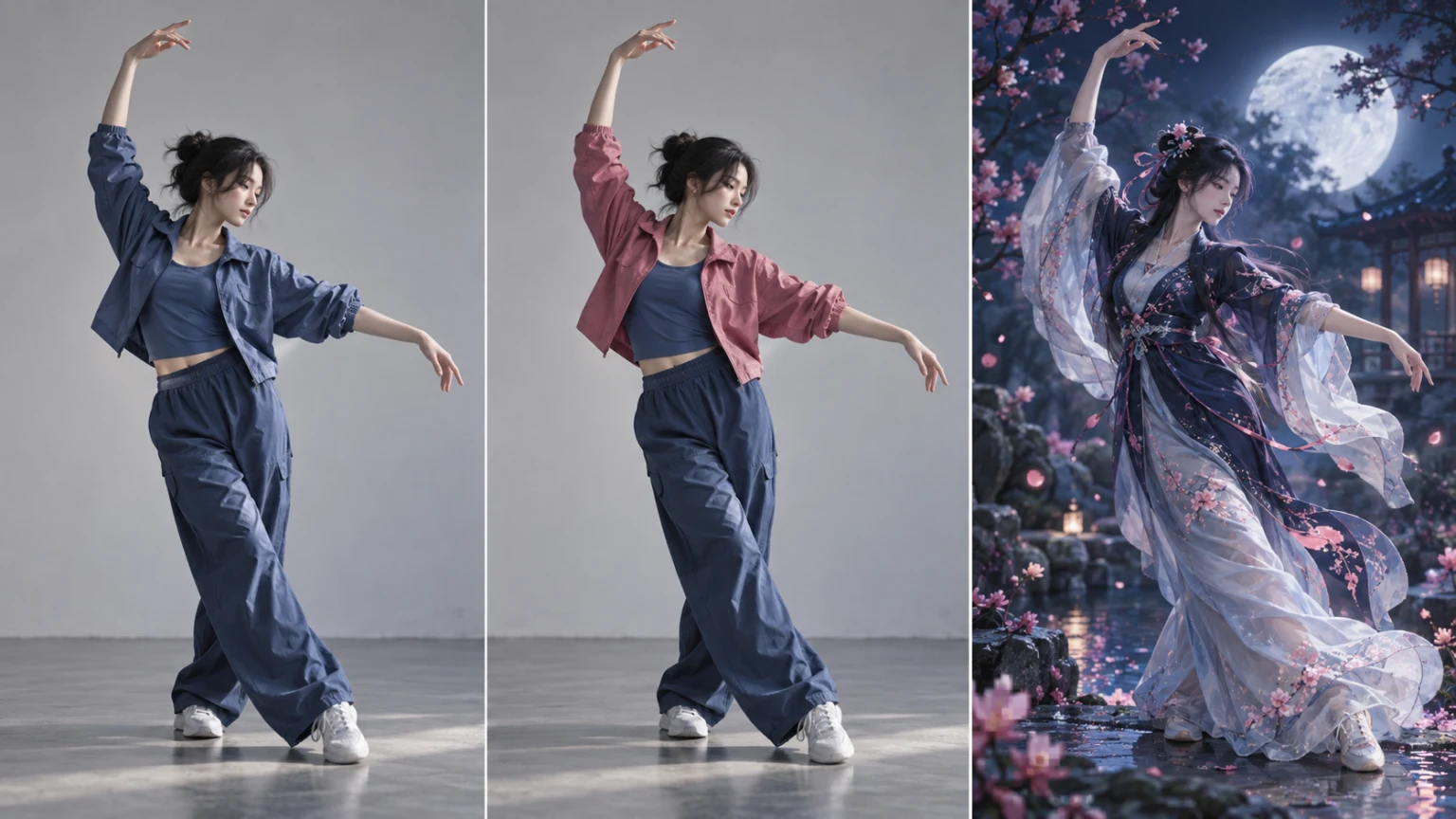
AI-generated concept illustration, not an actual Genjutsu result or product screenshot.
Choose an editing mode and a clear request
Object Swap targets the person, outfit or element you want to change. Motion Transfer uses source movement to guide a reconstructed character or scene. Start with one goal; preservation is intended behavior that still needs review.
Use a clear reference that shows the desired person or item. Remove contradictory images; the maximum reference count is not a target. A preset or optional short instruction can guide the edit. These are original examples, not tested outputs:
Outfit: Replace the dancer's blue jacket with the pink jacket in the reference. Keep the face, arm movement, framing and studio background.
Scene: Use the reference character in a moonlit garden. Retain the source arm movement and camera timing, with blue-white light and a natural landing.
For several people, consult the character replacement guide. Review the beginning, middle and end, including sleeve boundaries, hands, occlusions, face, background and foot contact. Play the whole clip and check sound separately; audio preservation is not verified for every mode. Identify one defect before revising a reference or instruction, then recheck the quote and remaining allowance.
Can this studio use my Higgsfield free trial?
No. This website is an independent studio with separate accounts, generation routes and billing. It does not provide the official Higgsfield Genjutsu model or accept Higgsfield trial credits. See where to use the official tool and our independent-service disclosure.
You can select local files, preview them and prepare a prompt here without starting a paid render. Sign in for uploads, input checks and this studio's quote. Confirming generation reserves the quoted credits. Any applicable grant must appear in this account; one-time credit packs are purchases, not a free trial. Review plans and credits before choosing this separate workflow.
Use the editor below to prepare your files and settings, then review the quote before confirming. Once a job succeeds and output checks pass, you can download its available result without extra studio credits. Official trial export rules are separate.
For alternative tools, compare the watermark-free download conditions: editing access, credits, export rights and commercial licensing need separate checks.